Introduction
You are going to start lesson 1
Introduction
Welcome! 👋
Where the information board is the screen for the group, the app is the screen for one person: on their own phone or tablet, the client sees what is on today's schedule, as a visual list with a photo, a short text, and a time.
You simply schedule in the online environment. The app retrieves that schedule, sends a notification when something starts, and lets the client check off what is finished themselves.
What we see in practice: that provides autonomy. Clients no longer need to ask what needs to be done next, making them less dependent on support. 🌱
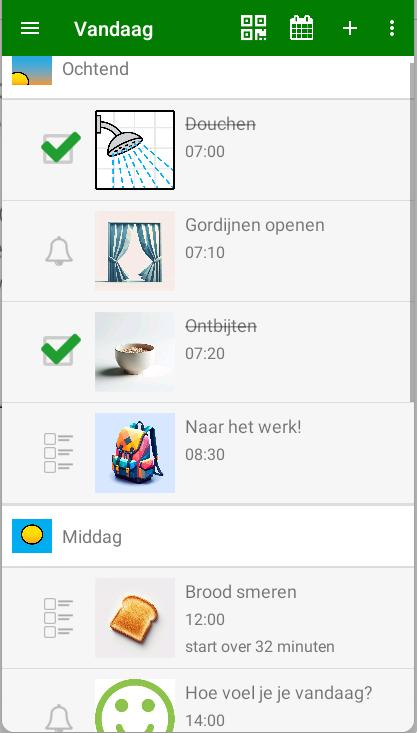
Did you know? Using the app is simply included in the price if you already have an information board in the group? So definitely give it a try!
More than a day program 🤖
You can also add helpers to it: small assistants that support someone right when needed. Think of titles like 'I don't feel well', 'The doorbell rings', 'Traveling independently' or 'Grocery shopping'. You can easily link steps or instructions to this for extra guidance.
You build them yourself using the same building blocks as a regular activity: a photo, a brief explanation, a step-by-step plan, or a choice. That way, the support fits the person perfectly. Later in this module, we will get started with this. 💪
What are you going to learn?
- Installing and activating: putting the app on a phone or tablet and linking it to the right person.
- Setting up the app: tailoring the screen to the client.
- Planning: adding a client and scheduling activities, online and in the app itself.
- Self-reliance: planning tightly or flexibly, and choosing the type of activity that fits.
- Helpers: activities without a fixed time, which the client starts whenever they need them.
- Library: saving time by reusing step-by-step plans, tasks, and parts of the daily structure.
Each lesson contains short videos and ends with a quiz. 🚀